

Introduction
Field plugins are standalone applications that are embedded within the Visual Editor in inline frames (iframes). This allows developers to fulfill requirements that are specific to their use cases, such as integrating the Visual Editor and Storyblok’s APIs with web-based, third-party services.
Conceptual overview
Section titled “Conceptual overview”As field plugins are embedded within iframes, they are sandboxed and do not have direct access to the Storyblok frontend application. Instead, all cross-origin communication between field plugins and the Visual Editor is handled securely via window.postMessage. The Visual Editor can send events to the field plugin containing information such as the current content. Likewise, the field plugin can send messages back to the Visual Editor containing information such as updated content.
When creating a field plugin, it is not necessary to learn exactly how this communication works. Storyblok provides the @storyblok/field-plugin library with an abstraction layer that exposes an object of type FieldPluginResponse with two properties:
FieldPluginResponse.data: An object that describes the state of the field plugin. When the Visual Editor sends a message to the field plugin application, the message is parsed and stored in this object.FieldPluginResponse.actions: An object whose properties are functions that allow the field plugin application to communicate with the Visual Editor. When invoked, @storyblok/field-plugin will send a message to the Visual Editor via the iframe window.
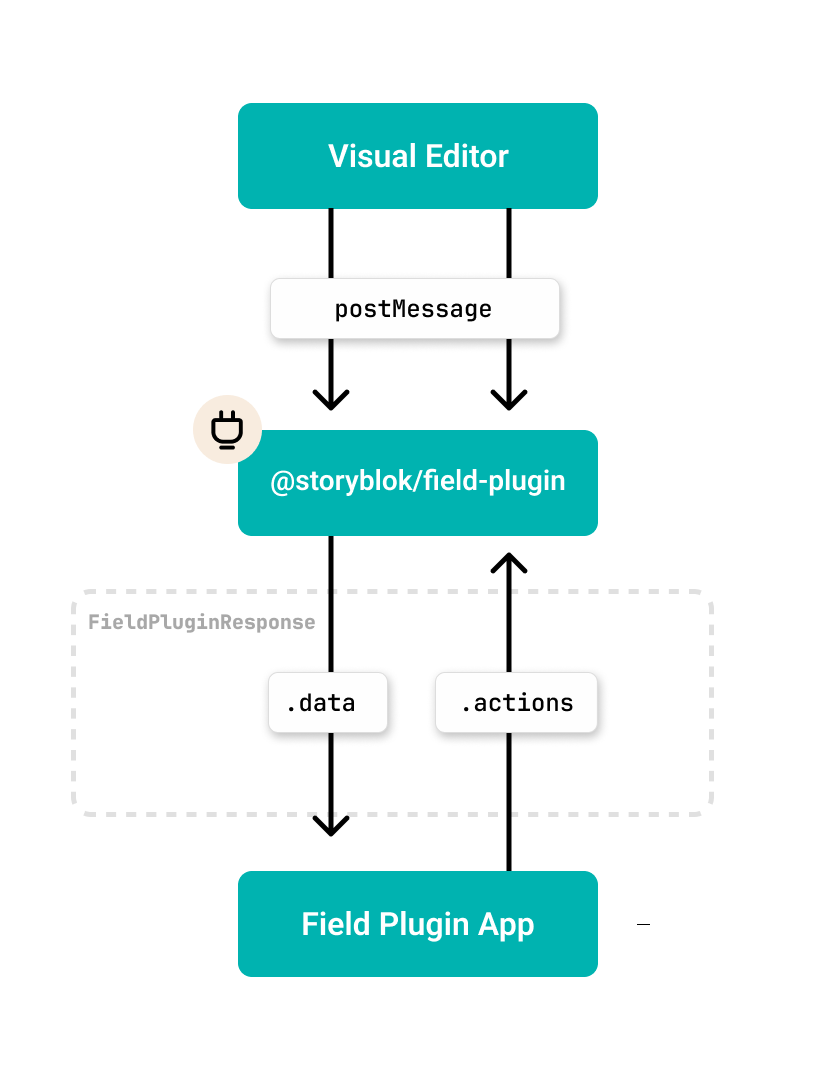
Field plugin workflow
Serving field plugins
Section titled “Serving field plugins”Field plugins are hosted by Storyblok. Therefore, the creators of field plugins are not required to maintain any server infrastructure. The creator compiles their application into a single JavaScript bundle and uploads it to the Storyblok application. When a Visual Editor user opens a block containing the field plugin, Storyblok serves a barebones HTML document that contains a script element with the bundle.
<!DOCTYPE html><html><head></head><body> <script> // Your code is inserted here </script></body></html>All application logic, assets, and styles must be bundled into this one script. This has the following implications:
- CSS should be embedded within the JavaScript code because it cannot easily be linked with a link element. All field plugin starters use Vite and vite-plugin-css-injected-by-js to automatically bundle the CSS within the JavaScript bundle. This means that you can keep using CSS, Sass, CSS modules, etc. as you normally would, because the CSS bundle will be converted into JavaScript and inlined in the JavaScript bundle. Another option is to use a CSS-in-JavaScript solution such as Emotion or JSS. CSS can also be linked, but that requires you to self-host the CSS file and dynamically insert a new link element dynamically in JavaScript.
- Image assets must be Base64-encoded in the source code, as they cannot be uploaded to Storyblok via the field plugin editor. You can also self-host assets.
- Code splitting is not available, as all code must be loaded from the same endpoint.
- All code executes on the client. For server-side code, the field plugin creator is required to self-host. Storyblok recommends using serverless functions.
Features and use cases
Section titled “Features and use cases”Updating content
Section titled “Updating content”Field Plugins are used by editors to update the content of stories. For example, if a block schema has been configured with a custom field type with the name example, the content that the field plugin produces will be stored as the value of the property example in the API response.
Options
Section titled “Options”Inside a block schema, it is possible to pass so-called options to the field plugin. Options allow space administrators to configure field plugins without modifying the underlying code. They are provided on a per-field basis. This is useful when the field plugin needs to be configured differently across spaces or blocks. For example in the Slider field plugin, different fields will require different ranges.
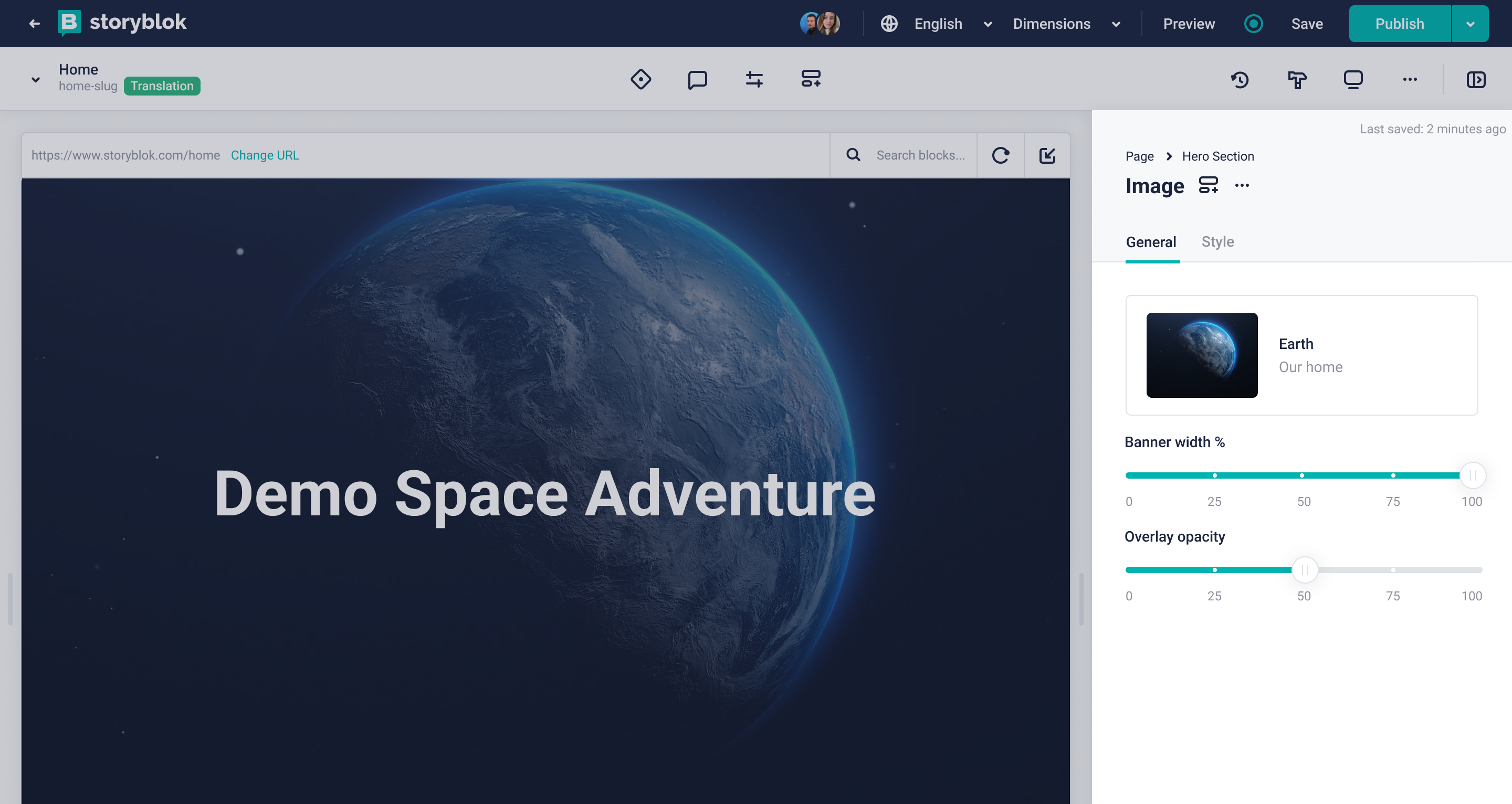
Slider field plugin
Options are key-value pairs where both the key and the value are strings. There’s no validation inside the Storyblok application, and for this reason, it is recommended that field plugin application logic validates the options at runtime and provides fallback values where the validation fails.
- Validate that the option is present and provide fallbacks where possible. For example, the slider field plugin will fall back to using the range 0-100 if the options
minValueandmaxValuewere omitted. - Validate the format of the option. For example, the slider field plugin expects that the
minValueandmaxValueare stringified numbers.
Field plugins can be configured with default template options, allowing space administrators to easily identify which options are available.
For security reasons, the options values defined through the field plugin editor are accessible only during development. Once the field plugin is added to a Story, only the options keys are replicated.
Modal dialog
Section titled “Modal dialog”Field plugins can open modal dialog windows. When a field plugin is displayed in the Visual Editor – sandwiched in-between other fields – its width is heavily limited to the content form’s width. Modal dialogs are useful when the user needs a larger surface to work in. For example, the Shopify field plugin allows the user to search and pick products from a grid in a modal dialog window so that it’s easier to find the results.
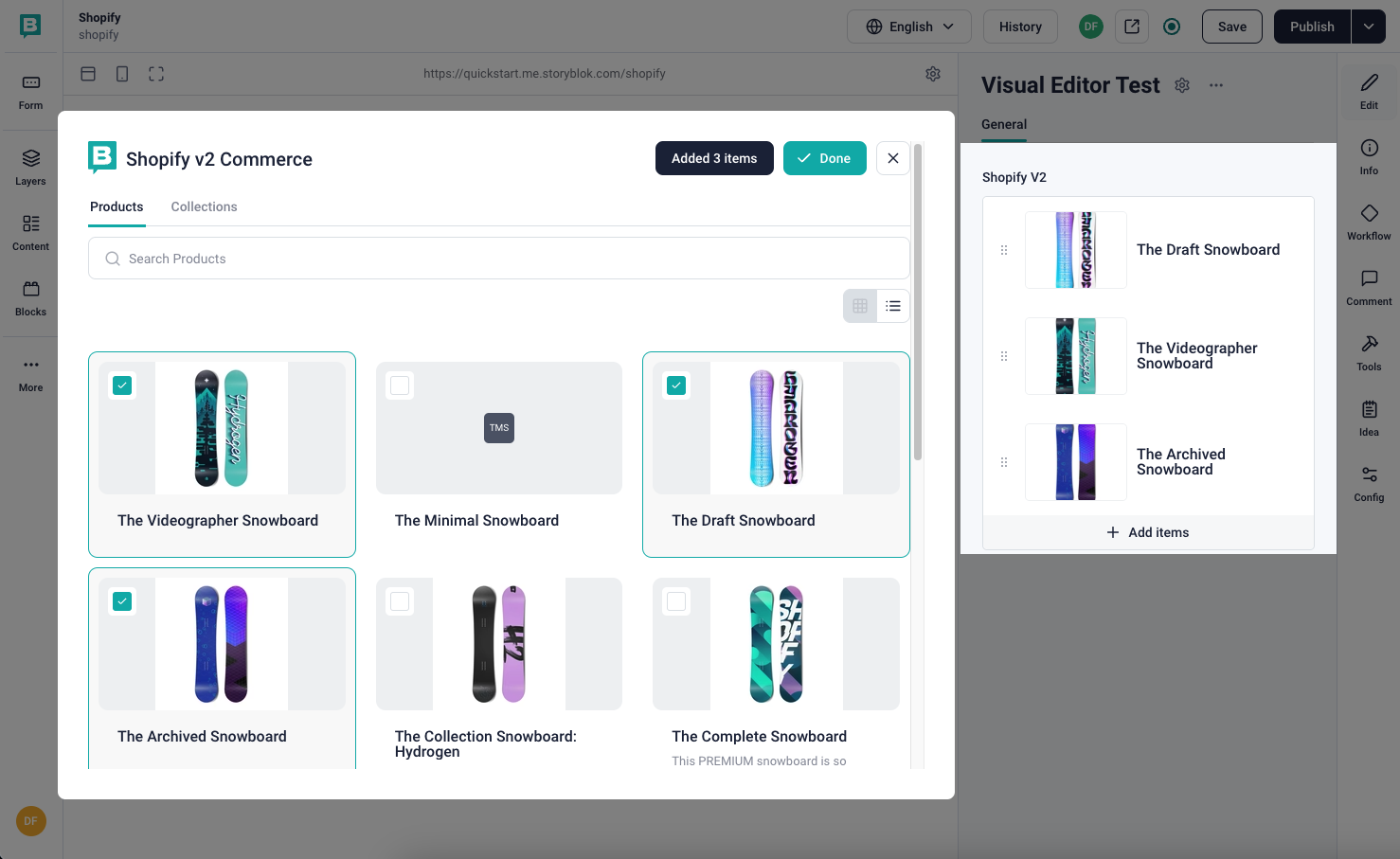
Shopify Field Plugin
The API is different from most front-end frameworks. Because field plugins are embedded within iframes, any modal window in the field plugin application itself would be constrained by the iframe element’s bounds; an embedded application cannot open a modal window in the parent window.
To circumvent this, the Visual Editor employs a trick wherein the iframe element itself becomes a modal window. Normally, the iframe window is positioned relative to the neighboring fields. But by sending a message from the field plugin to the Visual Editor, the Visual Editor will change the position to fixed and maximize the iframe’s size. Now, the field plugin can render itself differently, based on whether it is positioned relatively or fixed in the Visual Editor.
Asset selector
Section titled “Asset selector”Field plugin can integrate with Storyblok’s built-in asset manager. Some field plugins need to access the space’s assets.
Automatic resizing
Section titled “Automatic resizing”Field plugins vary in size, but one slight problem with iframe elements is that they cannot respond to the size of the windows that they embed.
The Visual Editor stacks the inputs for fields vertically. This includes the iframes that field plugins are embedded with. The embedded documents can have different heights, so the iframe elements need to be dynamically updated upon interaction with the field plugin.
Therefore, @storyblok/field-plugin listens to the height of the document. On change, a message is sent to the Visual Editor which dynamically sets the height of the wrapping iframe element.
Was this page helpful?
This site uses reCAPTCHA and Google's Privacy Policy (opens in a new window) . Terms of Service (opens in a new window) apply.
Get in touch with the Storyblok community